The error " In Order to Configure TCP/IP You Must Install and Enable a Network Adapter Card" occur because wrong network driver installed on your PC. This issue is common if you are using Intel Gigabit Network Adapter and it may happen for other LAN/Ethernet Controller such as Realtek or Broadcom. This error will appear whenever you try to:
1. Download the right drivers for you Network adapter. If you are using Intel network adapter you can download the latest drivers from here:
https://downloadcenter.intel.com/SearchResult.aspx?lang=eng&ProdId=3024
Just select the drivers base on your operating system (Windows XP/Vista/7 or 8 or others).
or
You can also let intel automatically detect the best drivers for you:
Link: http://www.intel.com/p/en_US/support/detect
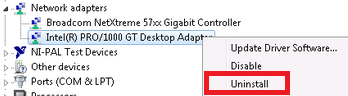
2. Next step is to uninstall the current drivers, go to device manager and look for network adapter. Right click on it and select uninstall. Here is an example:
3. We also need to uninstall Intel PROSet/Wireless WiFi Software in control panel - add/remove program.
4. Now install the latest drivers and reboot.
Additional Reading - explanation.
My friend just installed windows 7 on a PC and he want to setup a local area connection. It is a HP Compaq dc7900 desktop PC which uses Intel(R) PRO/1000 Gigabit Ethernet Controller. So I asked him to configure the IP adress but hes unable to do so because of this error. I asked him to look at the device manager and surprisingly it shows Intel 82567lm-3 network adapter. So, thats how I figure out the solution, wrong driver for the wrong adapter is the reason you are getting this error.
Just for you information, it is a normal situation where windows automatically determine which is the best drivers for your network card. So it install the driver during windows installation, but keep in mind that the default drivers not always the best. You need to find the latest drivers or download the original drivers from your manufacturer for the best performance and result. Why? latest drivers is more stable and keep up with the latest technology and the drivers from your manufacture is specifically design and tested for you specific model.
Read More..
- Change IP Address
- Change DNS Server
1. Download the right drivers for you Network adapter. If you are using Intel network adapter you can download the latest drivers from here:
https://downloadcenter.intel.com/SearchResult.aspx?lang=eng&ProdId=3024
Just select the drivers base on your operating system (Windows XP/Vista/7 or 8 or others).
or
You can also let intel automatically detect the best drivers for you:
Link: http://www.intel.com/p/en_US/support/detect
2. Next step is to uninstall the current drivers, go to device manager and look for network adapter. Right click on it and select uninstall. Here is an example:
3. We also need to uninstall Intel PROSet/Wireless WiFi Software in control panel - add/remove program.
4. Now install the latest drivers and reboot.
Additional Reading - explanation.
My friend just installed windows 7 on a PC and he want to setup a local area connection. It is a HP Compaq dc7900 desktop PC which uses Intel(R) PRO/1000 Gigabit Ethernet Controller. So I asked him to configure the IP adress but hes unable to do so because of this error. I asked him to look at the device manager and surprisingly it shows Intel 82567lm-3 network adapter. So, thats how I figure out the solution, wrong driver for the wrong adapter is the reason you are getting this error.
Just for you information, it is a normal situation where windows automatically determine which is the best drivers for your network card. So it install the driver during windows installation, but keep in mind that the default drivers not always the best. You need to find the latest drivers or download the original drivers from your manufacturer for the best performance and result. Why? latest drivers is more stable and keep up with the latest technology and the drivers from your manufacture is specifically design and tested for you specific model.