Showing posts with label to. Show all posts

Saturday, April 4, 2015

The error " In Order to Configure TCP/IP You Must Install and Enable a Network Adapter Card" occur because wrong network driver installed on your PC. This issue is common if you are using Intel Gigabit Network Adapter and it may happen for other LAN/Ethernet Controller such as Realtek or Broadcom. This error will appear whenever you try to:
  • Change IP Address
  • Change DNS Server
If you have this problem (like my friend who asking me about this today) you can solve it by using the following steps:

1. Download the right drivers for you Network adapter. If you are using Intel network adapter you can download the latest drivers from here:

https://downloadcenter.intel.com/SearchResult.aspx?lang=eng&ProdId=3024

Just select the drivers base on your operating system (Windows XP/Vista/7 or 8 or others).

or

You can also let intel automatically detect the best drivers for you:
Link: http://www.intel.com/p/en_US/support/detect

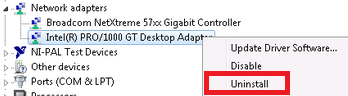
2. Next step is to uninstall the current drivers, go to device manager and look for network adapter. Right click on it and select uninstall. Here is an example:


3. We also need to uninstall Intel PROSet/Wireless WiFi Software in control panel - add/remove program.

4. Now install the latest drivers and reboot.

Additional Reading - explanation.
My friend just installed windows 7 on a PC and he want to setup a local area connection. It is a HP Compaq dc7900 desktop PC which uses Intel(R) PRO/1000 Gigabit Ethernet Controller. So I asked him to configure the IP adress but hes unable to do so because of this error. I asked him to look at the device manager and surprisingly it shows Intel 82567lm-3 network adapter. So, thats how I figure out the solution, wrong driver for the wrong adapter is the reason you are getting this error.

Just for you information, it is a normal situation where windows automatically determine which is the best drivers for your network card. So it install the driver during windows installation, but keep in mind that the default drivers not always the best. You need to find the latest drivers or download the original drivers from your manufacturer for the best performance and result. Why? latest drivers is more stable and keep up with the latest technology and the drivers from your manufacture is specifically design and tested for you specific model.
Read More..

Thursday, March 26, 2015


Lets see how Lenovo introduces ThinkPad Tablet 2:

The Tablet youve been waiting for
The thin and light design, all-day battery life, always-on connectivity and smooth multitouch convenience consumers expect from tablets. The security, manageability, and compatibility with existing commercial environments IT Managers expect from PCs. The ThinkPad Tablet 2 with up to Windows 8 Pro and full Microsoft Office support redefines your expectations for business and personal computing on the go.

We love the identity, thats a ThinkPad for first look. We also love the build quality that Lenovo applied to ThinkPad Tablet 2. The built-in features and applications are great; and its accessories also look professional.


But we actually care of its configuration:

  • Up to next generation Intel® Atom SoC processor
  • Up to Windows 8 Pro
  • 10.1" multitouch HD display (1366x768 HD)
  • Starting at 1.25 lbs / 565g
  • Up to 10 hours battery life
  • 64GB eMMC
  • Up to 2GB LPDD2 SDRAM

I never think of buying an Atom one. We want a stronger one, not just for surfing the web or remoting to other PCs. That why we should wait for ThinkPad Helix - the one that promises to combine the performance of a business Ultrabook™ with the mobility of a Windows 8 tablet.

Maybe your thoughts are different, just order one to enjoy: http://www.lenovo.com/products/us/tablet/thinkpad/thinkpad-tablet-2/
Read More..

Wednesday, March 25, 2015

Hi all, 

I bought a T440P laptop with 256GB Solid State HDD. I am already out of space. how can add a secondary hard disk to the machine? I want this in addition to my existing drive. I am thinking of buying "HGST Travelstar 2.5-Inch 1TB 7200RPM SATA 6GB/s 32MB Cache Internal Hard Drive".Will this fit in my laptop? and are there any instructions available to add it?

Thanks,

dk


View the original article here

Read More..

Tuesday, March 24, 2015

 Apple iPad

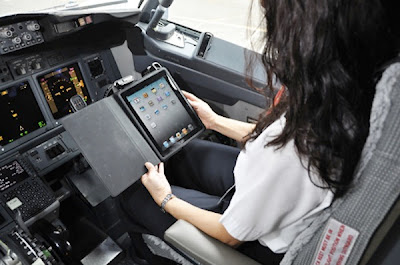
Many will already be familiar with the story of 1987 of how American Airlines saved $ 40 billion to remove an olive from each Salad served in first class menu. The following news is not so surprising but reflects the same spirit: how "think different" allows, among other things, address it to the recession and the unstable economic climate. This week, the same air carrier has started a pilot program for the Apple iPad in flight.

American Airlines, the airline based in United States, has announced that this week would begin with a pilot for the iPad. As we have seen on other occasions, the company replaced its tables and charts on paper by the multi-touch Tablet from Apple. As reported, this strategy would save you the company up 1.2 million dollars per year in fuel costs. Yes, they read well.

I imagine that some of you are wondering what they have to see the graphics on paper with the spending of gasoline from a plane. According to MarketWatch, publication of The Wall Street Journal dedicated to business news network, the sacks containing these documents of route weigh, in the best cases, around 35 pounds (16 kg). Make a digital one switch or two iPads per flight would dramatically reduce the weight and would enable significant fuel savings.

The initiative has already been approved by the FAA (Federal Aviation Administration), from this moment both private and commercial flights are authorized to implement the Apple tablets in his travels. In the case of American Airlines, this week will begin to do tests with two of their outbound flights from Los Angeles to Tokyo and Shanghai.

It should be noted that American Airlines is not the first to resort to this strategy. Last may, Alaska Air announced cordite that would begin to do testing during their flights using iPads, and remember that weeks ago here in AppleWeblog, they had on the decision of the body of Marines of the United States do the same.

In addition to being an ideal device for leisure and the entertenimiento, the Cupertino iPad has become a powerful tool for work and productivity. Also, as if all this was shortly after, the high capacity of adaptamiento of Apple devices allowed be used in more complex and specialized tasks such as aerial journeys, surgeries of knees, and space travel. Who would have said so? The lives of around 200 people--literally--in the hands of a pilot and his oversized iPhone.

Read More..

Drivers or Kext’s as we know in Mac parlance are considered as quintessential for running a PC. But at times faulty drivers also end up giving PC users more of a headache than being the pivotal elements on which an OS runs. Thus in the bargain making their uninstallation a more of a hard reality than anything else. So, without adieu it would be worth harping on the facts coming in handy towards uninstalling the drivers on your Mac OS X 10.6. Well, here they go:

1.       Remember, Driver’s or Kext’s are installed in System/ Library/ Extensions. To delete or remove a driver all you need to do is drag the driver to the trash and initiate the reboot process

2.       Pay attention to what you are deleting. Ensure you are deleting only a driver and not any of the Apple installed Kext’s

3.       Any deletion or installation of drivers (Kext’s) would make the reboot process a whole longer as the Kext cache  would need to be rebuilt

If you have any Inquiry Regarding PCCare247 Inc. or Services than just go through our official website www.pccare247.com.

Ring and Grab Online Technical Support Services at +1-855-877-5848
Read More..

Using Windows to modernize High Definition Audio device Drivers


Click Here FLV MPlayer - Free Download


ItemTitle


Which High Definition Audio device Drivers Can Windows Update?

Microsofts Windows update tool does far more than plainly update the Windows operating system; it also updates a large variety of device drivers from a host of different manufacturers. In general, if a device is labeled "Plug and Play" or bears the Windows logo, updating its drivers through Windows update should be possible. As part of its Plug and Play and Windows Logo programs, Microsoft encourages participating manufacturers to use its system to distribute updated device software along with high definition audio device drivers. However, this is a voluntary system, so theres no certify that Windows update will include the newest high definition audio device drivers for your device.

How to Use Windows update to Check for High Definition Audio device Drivers

If your computer is set up to automatically originate Windows update according to a preset schedule, it will automatically download and install new drivers (or prompt you as needed). If not, you can either originate Windows update manually or you can use the device Manager.

To do this, go to the control Panel > system and safety > Windows Update. Click "Check for updates." Your computer will join together to the Microsoft update server and inform you of any new updates. Depending on your existing configuration and whats currently available, you may or may not see updates for your high definition audio device drivers.

Using device boss to update Hd Audio Devices

To use device Manager, go to the control Panel > device Manager. Youll see a list of general categories. Expand the Sound, Video, and Game Controllers kind and double-click your high definition sound device. Click the Driver tab followed by the update Driver button. Once clicked, a new window opens gift to quest for new drivers automatically or prompting you to browse your computer for a file. Choose the automatic option. Windows will now join together to the Microsoft server in quest for an updated driver for your definite audio device. If found, it will automatically download and install it. Again, this is potential when manufacturers make their updated device software available to Microsoft.

If no new device drivers are found, two possibilities exist: Microsoft does not have the newest drivers or no new drivers have been created. The next step is to check the manufacturers website directly. If the manufacturer has industrialized a new audio driver update but hasnt shared it with Microsoft, it will likely offer the driver update as a free download on its website. Youll need to find the retain section and look for a "driver download" (or similarly named) section. From there, you will need to enter the details for both your audio device as well as your operating system. These details matter! Make sure to adopt the strict driver for your system. Download the file and ensue the directions provided by the manufacturer to install it. Finally, reboot your computer to finalize the update.


Using Windows to modernize High Definition Audio device Drivers


Ibm Thinkpad


Ibm Thinkpad


Using Windows to modernize High Definition Audio device Drivers


Using Windows to modernize High Definition Audio device Drivers


Using Windows to modernize High Definition Audio device Drivers


Ibm Thinkpad
Read More..
Apple warns iTunes users to wait on Vista until compatibility fix - USATODAY.com:

"Apple Inc. is urging some iPod and iTunes users to hold off on upgrading computers to Windows Vista, warning that the iTunes music software may not work well with the new operating system from rival Microsoft Corp.
Apple said iTunes may work with many Vista computers, but the company knows of some compatibility problems and recommends that users wait until it resolves the issues with an iTunes update in the next few weeks, the company said in a statement provided Friday by spokesman Derick Mains. The iTunes software is key to synching music on computers with iPod portable players."
Read More..